This article describes how to configure the Anybus defender to assign static VPN IP addresses to the VPN clients connected to the Anybud Defender OpenVPN server. This way you can easily connect your different remote Ewon devices (Ex : OPCUA or Modbus connections from SCADA) to or to the devices connected to them using routing (Remote access).
PREREQUISITES
We will assume that you have configured the Anybus Defender as described in the article
How to configure the Anybus Defender as VPN Server for Ewon Flexy/Cosy – HMS Support Portal
APPLICABLE PRODUCTS
Anybus Defender 4002, 6004, 6024 PROFW
Ewon Flexy
Ewon Cosy+
VERSIONS USED IN THIS ARTICLE
- Anybus Defender
- Flexy 205 14.9s4
- Cosy+ 22.0s4
Anybus Defender Configuration
Go to "VPN > OpenVPN> Client Specifc Override" and click
General Information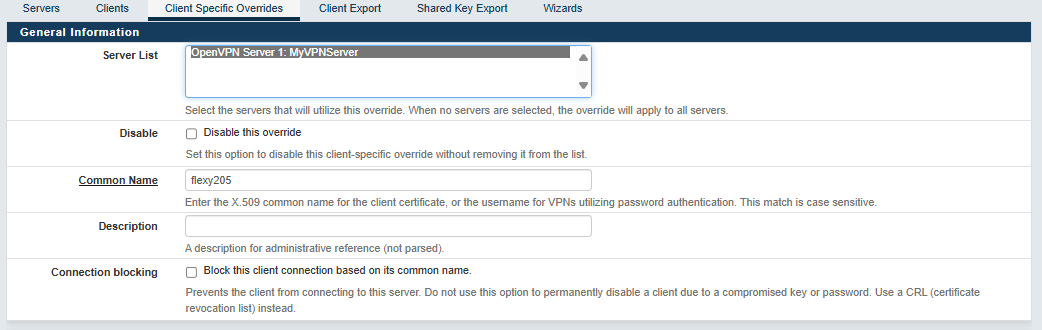
- Server List: select the OpenVPN server you have created
- Common name: type the name of the user you have created for your Ewon or for your computer in the User manager (case sensitive).
Client Settings
In the Advanced field, type
ifconfig-push <static IP> 255.255.255.0
where <static IP> must be replaced by the VPN Static IP address you want to assign to your VPN Client.